
Guide2 min read
Create a class and get its join code
Make one class per group you teach. Each class gets its own six-character code, roster and results.
Tested in the app · Updated October 2, 2026
A class keeps a group together: the students who joined, the homework you set and every game result. If you teach three groups, make three classes so their reports never mix.
Step 1: Open Classes
In Teacher HQ, open Classes. You will see every class you have, with its code and how many students are on the roster.
Step 2: Create the class
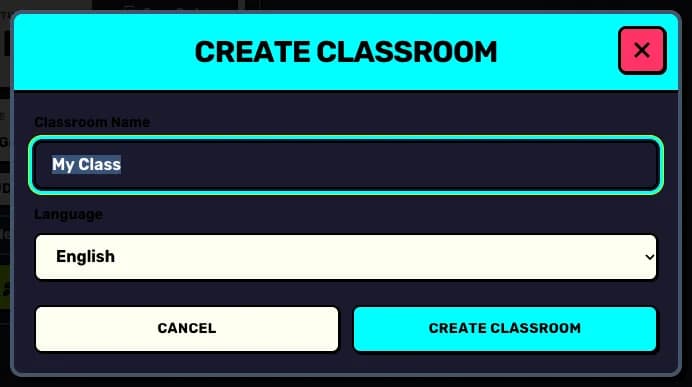
Press Create classroom, give it a name your students will recognise (for example "Year 7 English") and choose the language the class plays in.
Step 3: Share the code
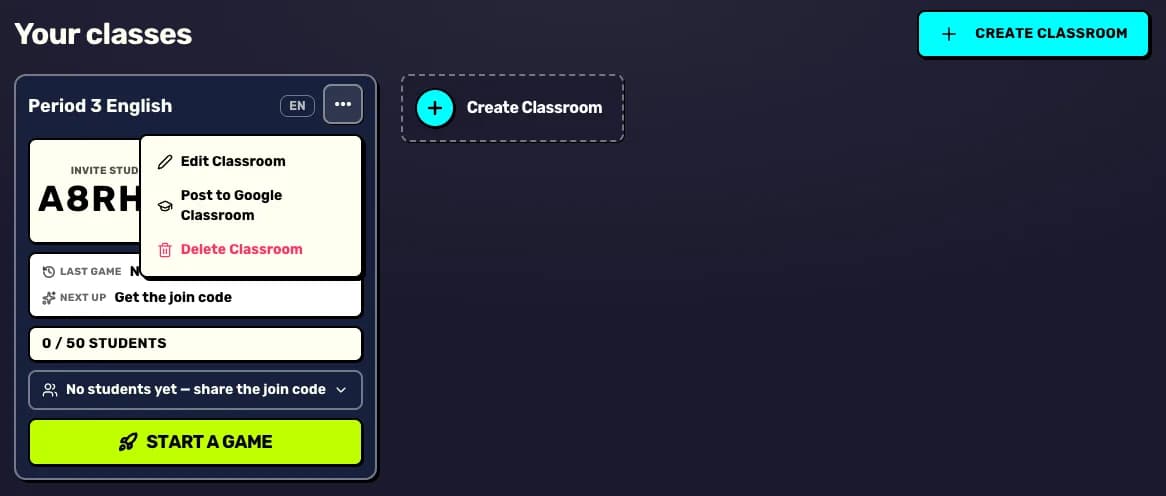
The new class card shows its join code. Use Copy code to paste it into your class chat, or project it from Play.
Step 4: Edit or tidy up later
The ⋯ menu on a class card lets you Edit classroom, Post to Google Classroom or Delete classroom.
Your next step
Try it with your class today
Teacher HQ is free. Press Go live and your join code is on the board in seconds.

Did this answer your question?